
"Commands Instead of Buttons"... Why AI Experts Prefer the 'Black Window' Terminal
As AI technology advances, tools like Codex, Claude Code, and Gemini CLI are evolving around the terminal environment rather than traditional GUIs. This shift allows AI to combine various tools and automate complex workflows by generating and executing code.
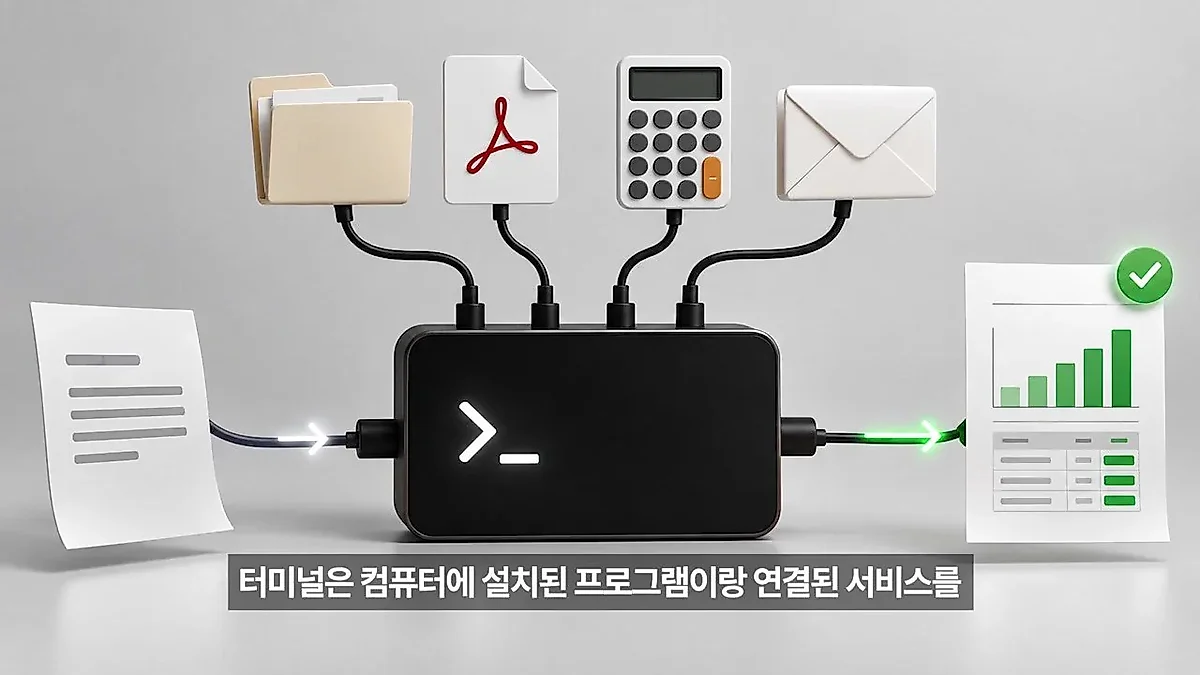
With the rapid advancement of artificial intelligence (AI) technology recently, tools such as Codex, Claude Code, and Gemini CLI are gaining attention. Notably, these latest AI tools are developing around the terminal environment—the so-called 'black window'—rather than user-friendly graphical interfaces (GUI). According to a video from the 'Impossible Engineering - New IT Technologies' channel, this environment, which may feel like a barrier to entry for general users, actually serves as the optimal workbench for performing complex tasks.
A Combination of Tools and Connectivity that Crosses App Boundaries
Existing software is specialized for specific purposes. Gmail is strong in sending emails, and Excel has strengths in calculation. However, actual work involves moving across multiple apps. For example, if one receives quotes from various clients in different formats, such as PDF, Excel, or email bodies, a person must open each file individually to extract data, move it to Excel to calculate, and then write a reply. Traditional automation methods had the inconvenience of requiring rule modifications every time a document format changed.
AI in a terminal environment overcomes these constraints. This is because one can command the AI to combine and use tools such as file searching, document analysis, calculation, and coding as needed. The video explains the process where the AI analyzes the user's request, selects the necessary tools, and directly generates and executes the code required for the intermediate steps. This is called CLI (Command Line Interface), a method of 'calling and using programs via commands.' The reason AI for developers developed in this environment first is that the series of processes—executing existing development tools, checking results and errors, and performing immediate corrections—is most efficiently carried out in the terminal.
Data Processing through Code Generation and Work Manualization
Beyond simply generating text, AI writes code as a 'calculation tool' to ensure data integrity. According to the case in the video, if the price notation method (unit price, box price, etc.) differs by company, the AI can find the packaging quantity in the document and directly write and execute short code to match the standard by dividing the box price by the quantity. Here, the AI performs the role of deciding which values to input and which criteria to use for comparison, while the actual calculation is handled by the executed program.
If the code generated during this process is saved as a file, it can be reused for similar tasks in the future. This means that instead of starting empty-handed every time, one can increase work efficiency by modifying existing code even if formats change. Furthermore, if the AI receives an error (e.g., file not found) after issuing a command, a feedback loop is formed where it decides the next action, such as re-exploring the folder or modifying a column name. The surrounding configuration that combines this model with tools, execution environments, and manages task records is referred to as a 'Harness.'
Technical protocols to reduce the repetitiveness of work are also mentioned. The protocol that allows AI to call functions of external services like Google in a common way is MCP (Model Context Protocol), and a work manual that bundles repetitive instructions, report formats, and necessary code is defined as a 'Skill.' Through this, a user can set the AI to work in the same manner even next month.
The Evolution of AI Workscreens and Future Utilization Standards
As for whether users must continue to stare only at the black window (terminal), positive changes are anticipated. Currently, tools like Claude Code are usable in desktop or web environments in addition to the terminal, and methods are being developed through MCP where the AI pops up manipulatable screens, such as tables or buttons, within the chat window. In other words, instead of the user needing to read all commands, interfaces are expected to be built where a button to check the original text is attached next to the AI-generated result, or visual interfaces show specific conditions (e.g., companies with unconfirmed shipping costs).
Ultimately, the standard for 'a person who uses AI well' in the future is expected to shift from terminal command proficiency to 'how much of one's repetitive work can be entrusted to the AI.' The analysis suggests that the core competency will not be giving up because a function is missing in a specific app, but rather the ability to create new workflows by connecting the necessary tools.


0Comments
Comments are currently disabled.